
Tracking the Flow: Bus Routes and On-Site Navigation at Agritechnica 2025

Agritechnica in Hanover is not a typical trade show. It is one of the world’s leading fairs for agricultural technology, spreading across many halls and large outdoor areas. For a week, the fairground turns into a temporary city with thousands of exhibitors, hundreds of thousands of visitors, and constant movement between entrances, parking zones and demonstration fields.
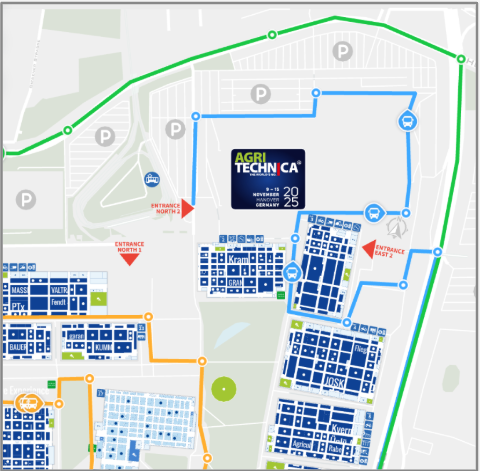
To keep people moving, the organiser runs a network of shuttle buses linking the most important points on the site. For visitors, this looks simple: they open the interactive map, see where the buses are and plan their next move.
Behind the scenes, the operations team needs to coordinate dozens of buses at once. Each bus is tracked on top of the ExpoFP map, so dispatchers can see where vehicles are, which routes are busy and where gaps appear.
The challenge
Each shuttle bus carried a phone with the tracking app connected to the interactive map. In normal operation, the app on every phone already knew:
- which map to use
- which secret code to use to send location data
After a server configuration change, these settings disappeared from all devices. From the staff’s perspective, nothing worked anymore: the app stopped sending positions and the buses vanished from the live map.
There was only one way to recover. Every phone had to come back to the coordinator’s desk so that someone from the team could type in the map link and passcode again. With multiple buses in circulation, this created a queue of people waiting just to have their phones reconfigured. For a while, dispatchers were managing devices instead of bus routes.
The organiser wanted to avoid this happening again and asked for three main improvements:
- a way to restore tracking on a phone without manual typing
- a process that bus staff can complete on their own, without returning to the coordinator
- a more predictable behaviour on the map when tracking stops or restarts
What we changed
QR codes for instant setup
First, we moved the map settings out of the app interface and into a single QR code. The organiser generates this code once and places a printed copy inside each bus. When the tracking app starts, a member of the bus staff scans the QR code and the phone receives everything it needs to connect to the right map.
This removed two common pain points at once: typing errors and the need for staff to handle each phone individually.
Fast recovery after resets
The same QR code also works as a recovery tool. If a phone loses its settings after an update, a reset or a SIM-card change, bus staff do not have to return to the operations centre. They scan the QR code again and the bus reappears on the map within seconds.
This is especially helpful during busy hours, when any extra trip across the fairground creates delays for visitors.
Cleaner input behaviour
Feedback from staff and coordinators also pointed to smaller UX issues. Correcting the map link sometimes meant deleting the whole value after a typo, and the passcode field did not handle overwriting very well. We adjusted both fields so that small changes are easier to make and the risk of accidental deletion is lower. These refinements do not show on the public map, but they reduce friction for the people who work with the system all day.
Clearer live view for coordinators
Another request from the team was to make the map state more predictable. During the first days of the fair, buses that stopped sending data sometimes stayed visible on the map for 30–60 minutes. This made it hard to see which vehicles were actually in service.
We aligned the behaviour between the tracking service and the map so that, when tracking stops, the corresponding bus disappears from the live view quickly. Dispatchers now have a cleaner picture when they decide how to balance routes or send extra vehicles.
Impact during the show
After these changes, configuring a new or reset device went from several minutes of manual work to a quick scan. Bus staff restored the phones on their own without leaving the route, and coordinators no longer maintained a queue of people waiting for reconfiguration.
Most importantly, shuttle buses stayed visible on a single map throughout the event. Visitors had one place to check where to catch the next bus, and the operations team had a reliable overview of fleet activity across the entire fairground.