Trade Show Budget Template for Organizers
Learn how to plan a trade show budget, estimate revenue and expenses, and track costs with our free downloadable Excel budget template.
Planning a trade show budget involves more than estimating venue costs and booth sales. Organizers also have to account for sponsorships, technology, staffing, production, and the expenses that come up as the event approaches.
A well-structured trade show budget template helps bring these numbers together, making it easier to forecast revenue, control expenses, and understand how much the event needs to generate to be profitable.
This guide includes a practical budget template for trade show organizers, the formulas needed to calculate break-even, and common budgeting mistakes to avoid.
The figures used throughout are examples. Organizers can adjust them based on their event size, venue, expected attendance, and previous results.
Who Is This Trade Show Budget Template For?
This template is designed for trade show and exhibition organizers, whether they are planning a regional event with 150 booths or a large international exhibition across multiple halls.
It covers the financial planning involved in organizing and operating an event, rather than the costs incurred by individual exhibitors.
Exhibitors generally follow a different budgeting process focused on booth rental, stand design, travel, staffing, and marketing.
Step 1: Estimate Your Trade Show Revenue
The first step is identifying where the event's revenue will come from.
Booth sales are often a major source of income for B2B exhibitions, but they are not the only opportunity. Sponsorship packages, premium booth locations, advertising, and additional exhibitor services can also contribute to the event's financial performance.
A useful approach is to forecast each revenue stream separately.
| Revenue Source | How to Calculate | Considerations |
|---|---|---|
| Booth space | Sellable area × average price per sq ft or m² | Account for expected booth occupancy |
| Shell-scheme packages | Number of packages × package price | Include bundled services |
| Premium booth locations | Premium booths × additional fee | Corner and island locations may command higher prices |
| Sponsorships | Sponsorship packages × package price | Include digital and on-site opportunities |
| Attendee registration | Paid attendees × ticket price | Some B2B exhibitions offer free admission |
| Conference passes | Expected delegates × registration fee | Separate from exhibition-only admission |
| Advertising and listings | Paid upgrades × price | Featured exhibitor listings and advertising |
| Additional services | Services sold × applicable margin | Furniture, utilities, and other exhibitor services |
For organizers selling booth space, pricing should reflect booth size, location, expected demand, and the value of participating in the event.
See our guide to booth pricing for more information.
Include Digital Sponsorship Opportunities
An interactive floor plan can also become part of an event's revenue strategy.
For example, organizers using ExpoFP can offer featured exhibitor listings, promotional placements, and sponsorship opportunities directly within their interactive maps.
These options give exhibitors additional visibility while creating revenue opportunities beyond traditional booth sales.
For more ideas, see How to Monetize Your Event Floor Plan, which covers six ways organizers can generate revenue from their maps.
Create Multiple Revenue Scenarios
Rather than assuming every available booth will sell, prepare three forecasts:
- Conservative: 70% of available booth space sold
- Expected: 85% of available booth space sold
- Optimistic: 95% of available booth space sold
These percentages are illustrative and should be adjusted using historical sales data and current market conditions.
Comparing scenarios helps organizers understand how changes in booth sales affect profitability and whether the event can cover its fixed costs under less favorable conditions.
Step 2: Identify Your Trade Show Expenses
Once revenue has been estimated, the next step is listing the costs involved in delivering the event.
Trade show expenses generally fall into two categories:
Fixed costs remain relatively stable regardless of attendance or booth sales.
Variable costs increase or decrease depending on event size, participation, and services required.
Some expenses include both fixed and variable components.
| Expense Category | Cost Type | Examples |
|---|---|---|
| Venue | Fixed | Hall rental, meeting rooms, move-in and move-out days |
| Venue services | Variable | Electricity, cleaning, security, internet, rigging |
| Production | Mixed | Floor plan design, carpeting, signage, stages, audiovisual equipment |
| Marketing | Mixed | Advertising, email campaigns, PR, printed materials |
| Registration | Variable | Registration software, badges, scanners |
| Technology | Mixed | Event apps, interactive floor plans, exhibitor portals, CRM |
| Staff and contractors | Mixed | Event staff, contractors, travel, accommodation |
| Content and speakers | Variable | Speaker fees, travel, session production |
| Hospitality | Variable | Catering, VIP areas, hosted buyer programs |
| Insurance and permits | Fixed | Liability insurance, permits, legal services |
| Contingency | Budget reserve | Unexpected expenses and last-minute adjustments |
Account for Event Technology
Technology is an important part of the event budget, particularly when organizers use multiple platforms to manage exhibitors, registration, navigation, and attendee engagement.
An interactive floor plan, for example, can serve several purposes throughout the event lifecycle.
With ExpoFP, organizers can create and maintain interactive maps, manage exhibitor information, support booth reservations, and offer digital sponsorship opportunities.
Considering these functions during budgeting helps organizers evaluate technology costs alongside the operational tasks those tools support.
Include a Contingency Budget
Unexpected costs are common during event planning.
Additional venue services, production changes, last-minute exhibitor requirements, and equipment adjustments can affect the final budget.
Setting aside a contingency reserve gives organizers more flexibility when these expenses arise.
The appropriate amount depends on the event's complexity, contractual commitments, and historical spending.
Step 3: Calculate Your Trade Show Break-Even Point
The break-even point is the revenue required to cover the event's costs without generating a profit or loss.
Understanding this figure helps organizers establish sales targets and evaluate whether their current pricing and expected participation are financially sustainable.
A common calculation is:
Break-even revenue = Fixed costs ÷ (1 − Variable cost ratio)
The variable cost ratio is calculated by dividing variable costs by forecast revenue.
Example: Trade Show Break-Even Calculation
Consider an exhibition with the following projected figures:
| Item | Amount |
|---|---|
| Fixed costs | $400,000 |
| Variable costs | $150,000 |
| Forecast revenue | $750,000 |
| Variable cost ratio | 20% |
The break-even calculation would be:
$400,000 ÷ (1 − 0.20) = $500,000
In this example, the event needs approximately $500,000 in revenue to cover its costs, assuming the variable cost ratio remains consistent.
If the average revenue per booth, including applicable upgrades, is $3,000, that would be equivalent to approximately 167 booths.
However, organizers should account for other revenue sources and their associated costs when translating the overall break-even point into booth sales targets.
Calculate Revenue per Square Meter
Another useful metric is the cost per unit of sellable exhibition space.
Total event costs ÷ Sellable exhibition area = Cost per sq ft or m²
This provides a basic benchmark for evaluating booth pricing.
It is not necessarily the minimum booth rate required to break even, particularly when the event generates revenue from sponsorships, tickets, and additional services.
Still, it can help organizers identify whether venue and production costs are proportionate to the available exhibition space.
Step 4: Trade Show Budget Template
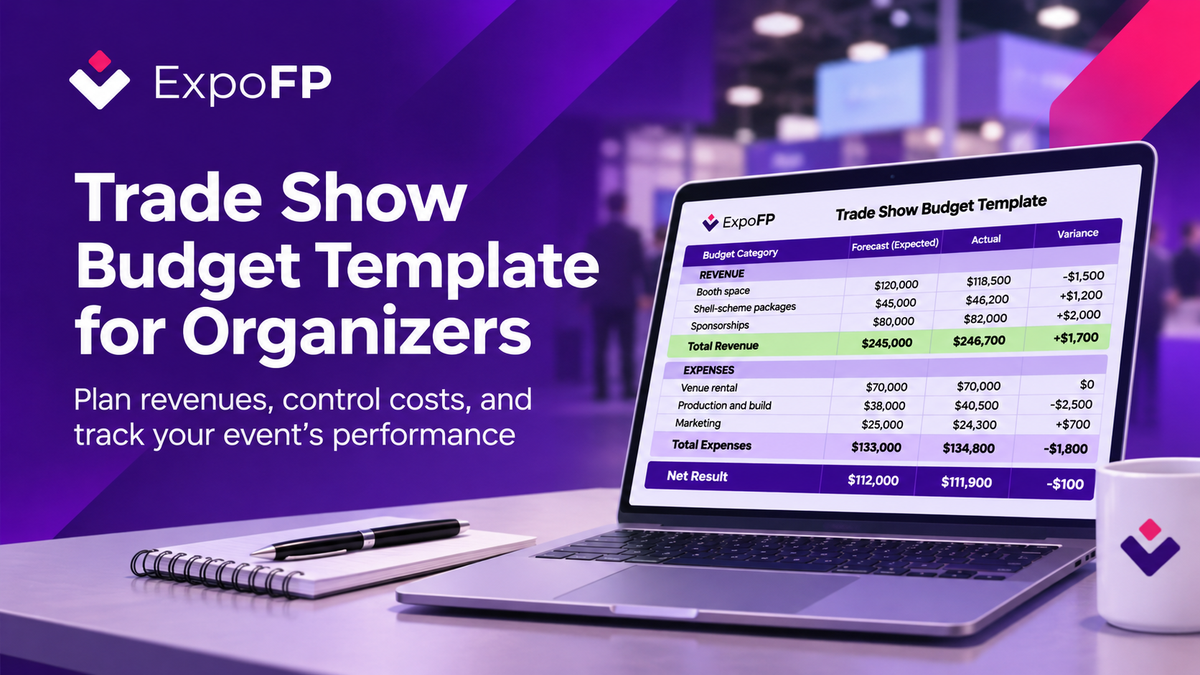
The following template provides a starting point for tracking projected revenue, expenses, and actual financial performance.
How to Use the Template
Start by entering the approved budget and updating the expected forecast as booth sales, sponsorships, and supplier costs become clearer.
As payments and expenses are recorded, enter the actual amounts and calculate the difference.
Variance = Actual − Forecast
For revenue, a positive variance indicates income above the forecast. For expenses, a positive variance indicates spending above the forecast.
Review the budget regularly throughout planning, with more frequent updates during the final two months before the event.
After the exhibition, compare actual results against the original budget to identify areas for improvement.
How Your Floor Plan Affects Your Trade Show Budget
The exhibition floor plan plays a direct role in financial planning.
It determines how much space can be sold, how many booths can be accommodated, and which locations may qualify for premium pricing.
For multi-hall events, the floor plan also helps organizers manage different booth categories, exhibition areas, and availability.
Managing Large Exhibitions with Interactive Floor Plans
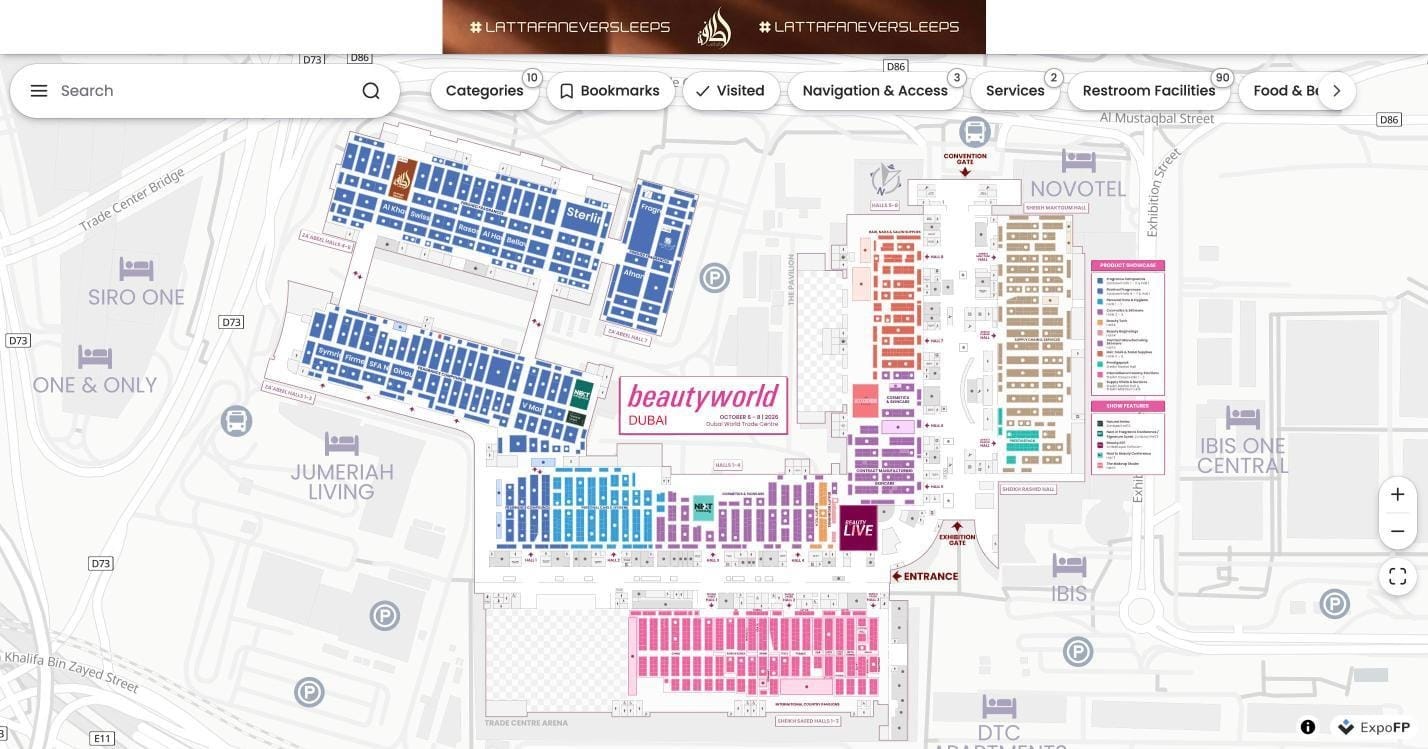
Beautyworld Middle East 2026, held at Dubai World Trade Centre, provides an example of how interactive floor plans can support large exhibitions.
With multiple halls, country pavilions, product showcases, and dedicated event features, organizers and attendees benefit from having exhibition information accessible through a single interactive map.
Connecting Booth Sales to the Floor Plan
Managing booth availability across spreadsheets and separate sales records can become increasingly complex as an exhibition grows.
An interactive floor plan gives organizers a visual way to manage available spaces and present booth information to potential exhibitors.
ExpoFP supports online booth reservations, helping organizers connect their floor plans with the exhibitor booking process.
Organizers can also offer sponsorship opportunities and premium exhibitor visibility within the map.
For a closer look at this process, read How to Sell Trade Show Booth Space Online Without Spreadsheets.
Common Trade Show Budgeting Mistakes
Even experienced organizers can encounter budget challenges. Several recurring mistakes are worth addressing early.
1. Assuming Every Booth Will Sell
Forecasting 100% booth occupancy can create unrealistic revenue expectations.
Use historical data, current booking trends, and realistic sales targets to estimate occupancy.
2. Overlooking Venue Service Costs
Electricity, rigging, internet access, cleaning, and security may be charged separately from venue rental.
Review the venue agreement carefully to understand which services are included.
3. Leaving Out Contingency
Unexpected production requirements and operational changes can affect the final budget.
A contingency reserve helps accommodate these expenses without immediately disrupting other budget categories.
4. Ignoring Cash Flow
An event may be profitable on paper while still experiencing cash flow difficulties.
Venue deposits, supplier payments, and production costs may be due before exhibitor payments are received.
Plan payment schedules alongside revenue forecasts.
5. Setting Booth Prices Based Only on Costs
Booth pricing also depends on market demand, event positioning, exhibitor expectations, and comparable exhibitions.
Review your costs alongside competitor pricing and the value offered to exhibitors.
6. Failing to Review Results After the Event
The final budget is a valuable planning resource for future editions.
Comparing projected and actual results helps organizers improve pricing, supplier negotiations, and revenue forecasts.
When Should Organizers Create a Trade Show Budget?
Budget planning should begin before signing major venue and supplier contracts.
An initial forecast helps organizers determine whether the proposed event size, location, and commercial model are financially realistic.
Once the venue and main expenses are confirmed, the budget can be reviewed and approved internally.
It should then be updated throughout the planning process as booth sales progress, sponsorships are secured, and costs become more predictable.
For a broader overview of event preparation, see our 18-month trade show planning timeline.
Frequently Asked Questions
What should a trade show budget include?
A trade show budget should include all expected revenue and expenses. Revenue typically comes from booth sales, sponsorships, registration, advertising, and additional services. Expenses include venue rental, production, marketing, technology, staffing, hospitality, and insurance. Organizers should also include contingency and break-even calculations.
How do I calculate break-even for a trade show?
Divide fixed costs by one minus the variable cost ratio. The result is the revenue required to cover costs. You can then compare that amount against expected booth sales and other revenue sources to determine whether the event is financially viable.
How much contingency should I include in my trade show budget?
There is no universal percentage. The appropriate contingency depends on event size, operational complexity, supplier agreements, and the likelihood of last-minute changes.
Is this trade show budget template suitable for exhibitors?
No. This template is intended for organizers managing the financial performance of an entire exhibition. Exhibitors generally use a separate budget covering booth rental, stand construction, travel, staffing, promotional materials, and lead generation.
How can an interactive floor plan support trade show revenue?
An interactive floor plan can help organizers display booth availability, support reservations, and offer digital sponsorship opportunities. Platforms such as ExpoFP allow organizers to connect their exhibition layouts with exhibitor information and booth booking processes.
Plan Your Trade Show Budget with Better Visibility
A trade show budget is most useful when it reflects how the event actually operates.
Accurate booth inventory, realistic revenue forecasts, clearly defined expenses, and regular financial reviews help organizers make informed decisions throughout the planning process.
Connecting exhibition planning with digital tools can also make it easier to manage booth availability and explore additional revenue opportunities.
Ready to manage booth space through an interactive floor plan?